Today Comes to the Mac
-
Today Comes to the Mac
When I launched Today on iOS last October, it was born out of that same Google Reader-shaped hole that never quite healed. A few months later, I kept finding myself reaching for it on my Mac — opening feeds on my phone while sitting in front of a perfectly good laptop. So I did something about it.
Today – An RSS Reader is now available on the Mac App Store.
Not Just a Bigger iPhone App
The easy path would have been to ship the iPad version with Mac Catalyst and call it a day. But that never feels right. A Mac app should feel like a Mac app — keyboard shortcuts, proper window management, menus in the menu bar.
Today on Mac uses a three-column layout: your feeds in the sidebar, articles in the middle, and the full article on the right. It’s the kind of layout that just makes sense when you have the screen real estate, and it makes triaging a busy morning of feeds feel effortless.
Keyboard Everything
This is the feature I keep coming back to. You can navigate the entire app without lifting your hands off the keyboard:
- J/K to move between articles — borrowed from Gmail, Vim, and the late great Google Reader
- Space to page through an article, then automatically advance to the next one when you hit the bottom
- Arrow keys to flip through image galleries
- Cmd+F to favorite, Cmd+U for read/unread, Cmd+O to pop it open in Safari
It’s the kind of flow where you can rip through 50 articles before your coffee gets cold.
Podcasts Get Their Own Window
On iOS, the Now Playing view is a sheet that slides up. On Mac, it felt wrong — you’d lose your article context. So podcasts open in their own dedicated window that you can move, resize, or tuck into a corner. It opens automatically when you start a podcast and supports chapter navigation, playback speed controls, and keyboard shortcuts (arrow keys to skip, space to pause).
The SwiftUI of It All
Bringing an iOS SwiftUI app to macOS is about 80% magical and 20% “why is this happening.” The data layer, most views, and the navigation structure just work. But then you discover that app-level menu commands silently swallow keyboard events before your views ever see them, and suddenly you’re routing key presses through NotificationCenter like it’s 2009. Window management was its own adventure —
WindowGroupand@Environment(\.openWindow)are genuinely elegant once you crack the incantation.The 80% that just works is remarkable, though. SwiftData, async/await, the entire service layer — zero changes between platforms. That’s the promise of SwiftUI actually delivering.
What’s Included
- Native three-column Mac layout with sidebar
- Full keyboard navigation (J/K, arrows, space, and more)
- Dedicated Now Playing window with chapter support
- Podcast playback with adjustable speed
- AI article summaries (still local-first)
- OPML import and export
- Reddit feed support with full media previews
- Custom accent colors
- Background sync
Get It
Today – An RSS Reader is free on the Mac App Store. If you’ve been using Today on your phone, you’ll feel right at home. If you’re new — welcome. RSS is alive and well.
P.S. — The iOS version continues to get updates (just landed iPad support) alongside the Mac release. Same codebase, same SwiftData store, same love for the open web.
#development #iOS #MacOS #NerdyStuff #RSS #Swift #Today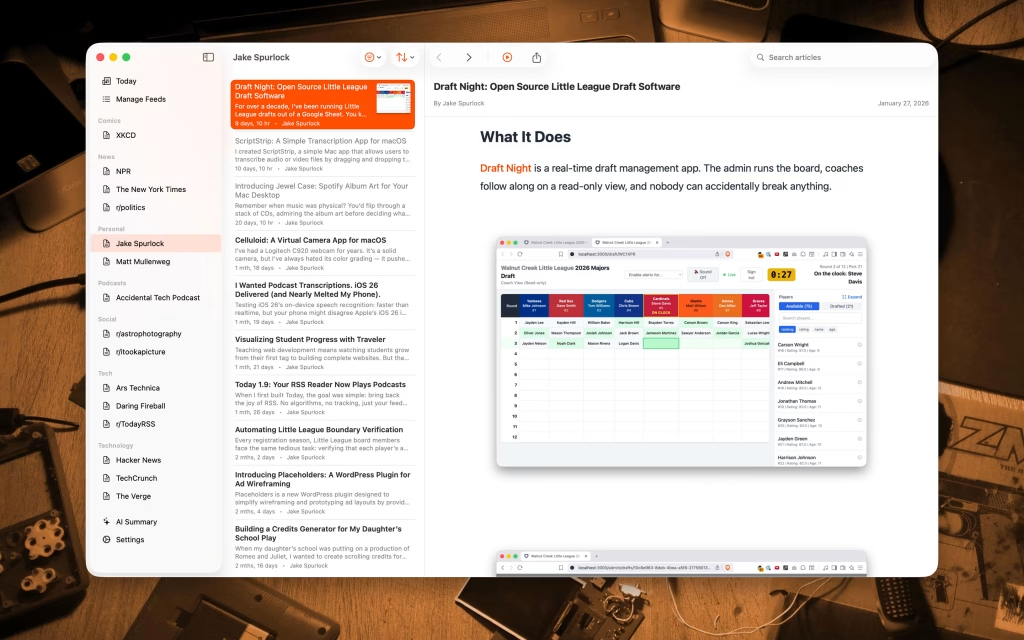
-
Today Comes to the Mac
When I launched Today on iOS last October, it was born out of that same Google Reader-shaped hole that never quite healed. A few months later, I kept finding myself reaching for it on my Mac — opening feeds on my phone while sitting in front of a perfectly good laptop. So I did something about it.
Today – An RSS Reader is now available on the Mac App Store.
Not Just a Bigger iPhone App
The easy path would have been to ship the iPad version with Mac Catalyst and call it a day. But that never feels right. A Mac app should feel like a Mac app — keyboard shortcuts, proper window management, menus in the menu bar.
Today on Mac uses a three-column layout: your feeds in the sidebar, articles in the middle, and the full article on the right. It’s the kind of layout that just makes sense when you have the screen real estate, and it makes triaging a busy morning of feeds feel effortless.
Keyboard Everything
This is the feature I keep coming back to. You can navigate the entire app without lifting your hands off the keyboard:
- J/K to move between articles — borrowed from Gmail, Vim, and the late great Google Reader
- Space to page through an article, then automatically advance to the next one when you hit the bottom
- Arrow keys to flip through image galleries
- Cmd+F to favorite, Cmd+U for read/unread, Cmd+O to pop it open in Safari
It’s the kind of flow where you can rip through 50 articles before your coffee gets cold.
Podcasts Get Their Own Window
On iOS, the Now Playing view is a sheet that slides up. On Mac, it felt wrong — you’d lose your article context. So podcasts open in their own dedicated window that you can move, resize, or tuck into a corner. It opens automatically when you start a podcast and supports chapter navigation, playback speed controls, and keyboard shortcuts (arrow keys to skip, space to pause).
The SwiftUI of It All
Bringing an iOS SwiftUI app to macOS is about 80% magical and 20% “why is this happening.” The data layer, most views, and the navigation structure just work. But then you discover that app-level menu commands silently swallow keyboard events before your views ever see them, and suddenly you’re routing key presses through NotificationCenter like it’s 2009. Window management was its own adventure —
WindowGroupand@Environment(\.openWindow)are genuinely elegant once you crack the incantation.The 80% that just works is remarkable, though. SwiftData, async/await, the entire service layer — zero changes between platforms. That’s the promise of SwiftUI actually delivering.
What’s Included
- Native three-column Mac layout with sidebar
- Full keyboard navigation (J/K, arrows, space, and more)
- Dedicated Now Playing window with chapter support
- Podcast playback with adjustable speed
- AI article summaries (still local-first)
- OPML import and export
- Reddit feed support with full media previews
- Custom accent colors
- Background sync
Get It
Today – An RSS Reader is free on the Mac App Store. If you’ve been using Today on your phone, you’ll feel right at home. If you’re new — welcome. RSS is alive and well.
P.S. — The iOS version continues to get updates (just landed iPad support) alongside the Mac release. Same codebase, same SwiftData store, same love for the open web.
#development #iOS #MacOS #NerdyStuff #RSS #Swift #Today@whyisjake Hello! Thanks for the hard work! Any chance to see feedly integration?
-
@whyisjake Hello! Thanks for the hard work! Any chance to see feedly integration?
@joseluisvelazq What would the integration look like? (I don’t use Feedly)
-
Today Comes to the Mac
When I launched Today on iOS last October, it was born out of that same Google Reader-shaped hole that never quite healed. A few months later, I kept finding myself reaching for it on my Mac — opening feeds on my phone while sitting in front of a perfectly good laptop. So I did something about it.
Today – An RSS Reader is now available on the Mac App Store.
Not Just a Bigger iPhone App
The easy path would have been to ship the iPad version with Mac Catalyst and call it a day. But that never feels right. A Mac app should feel like a Mac app — keyboard shortcuts, proper window management, menus in the menu bar.
Today on Mac uses a three-column layout: your feeds in the sidebar, articles in the middle, and the full article on the right. It’s the kind of layout that just makes sense when you have the screen real estate, and it makes triaging a busy morning of feeds feel effortless.
Keyboard Everything
This is the feature I keep coming back to. You can navigate the entire app without lifting your hands off the keyboard:
- J/K to move between articles — borrowed from Gmail, Vim, and the late great Google Reader
- Space to page through an article, then automatically advance to the next one when you hit the bottom
- Arrow keys to flip through image galleries
- Cmd+F to favorite, Cmd+U for read/unread, Cmd+O to pop it open in Safari
It’s the kind of flow where you can rip through 50 articles before your coffee gets cold.
Podcasts Get Their Own Window
On iOS, the Now Playing view is a sheet that slides up. On Mac, it felt wrong — you’d lose your article context. So podcasts open in their own dedicated window that you can move, resize, or tuck into a corner. It opens automatically when you start a podcast and supports chapter navigation, playback speed controls, and keyboard shortcuts (arrow keys to skip, space to pause).
The SwiftUI of It All
Bringing an iOS SwiftUI app to macOS is about 80% magical and 20% “why is this happening.” The data layer, most views, and the navigation structure just work. But then you discover that app-level menu commands silently swallow keyboard events before your views ever see them, and suddenly you’re routing key presses through NotificationCenter like it’s 2009. Window management was its own adventure —
WindowGroupand@Environment(\.openWindow)are genuinely elegant once you crack the incantation.The 80% that just works is remarkable, though. SwiftData, async/await, the entire service layer — zero changes between platforms. That’s the promise of SwiftUI actually delivering.
What’s Included
- Native three-column Mac layout with sidebar
- Full keyboard navigation (J/K, arrows, space, and more)
- Dedicated Now Playing window with chapter support
- Podcast playback with adjustable speed
- AI article summaries (still local-first)
- OPML import and export
- Reddit feed support with full media previews
- Custom accent colors
- Background sync
Get It
Today – An RSS Reader is free on the Mac App Store. If you’ve been using Today on your phone, you’ll feel right at home. If you’re new — welcome. RSS is alive and well.
P.S. — The iOS version continues to get updates (just landed iPad support) alongside the Mac release. Same codebase, same SwiftData store, same love for the open web.
#development #iOS #MacOS #NerdyStuff #RSS #Swift #Today@whyisjake Looks like a great piece of software. And it‘s for free? Awesome.
Only the app icon looks a bit too skeuomorphistic (is that the actual adjective?) for my taste. -
@whyisjake Looks like a great piece of software. And it‘s for free? Awesome.
Only the app icon looks a bit too skeuomorphistic (is that the actual adjective?) for my taste.@nevarro Pull requests are welcome ?



Hello! It looks like you're interested in this conversation, but you don't have an account yet.
Getting fed up of having to scroll through the same posts each visit? When you register for an account, you'll always come back to exactly where you were before, and choose to be notified of new replies (either via email, or push notification). You'll also be able to save bookmarks and upvote posts to show your appreciation to other community members.
With your input, this post could be even better 💗
Register LoginWelcome To Podcasting.Chat!
This forum is for podcasters, podcast guests, and podcast enthusiasts alike to share tips, tricks, and their love of the medium.
This forum is fully federated, so you are able to contribute to any discussion here through your own software of choice (e.g. Mastodon, Misskey, Lemmy, Piefed, etc.). So you can sign up for an account here and it federates around the Fediverse. You can also follow feeds and topics from your other Fedi-enabled accounts.
Recent Posts
-
How to quit algorithms
https://elgan.com/how-to-quit-algorithms
-
We’re live! Join us for today’s show with Shannon Morse and Len Peralta.
https://www.twitch.tv/dailytechnewsshow
https://www.youtube.com/dailytechnewsshow
https://www.linkedin.com/company/daily-tech-news-show
https://dailytechnewsshow.com/live/
https://Patreon.com/dtns
Thursday February 19, 2026
-
@sister_ratched @smitjo a vampire's dream
-